Sunday, August 12, 2012

Finishing touches on WiFi


The general idea behind the blue panels is to have them backlit like a computer screen. We have a solar panel donated by the NCSU Solar House that works – hooking it up is another matter! If it’s not hooked up with matching amps etc., it can explode! We gave up that idea and decided to use it as a prop; we purchased a kit of fairy lights with a small solar panel. The lights are strung around the inside of the monitor frame and are bright enough for the writing to be legible in the dark.

untitled-9             untitled-8


Collecting street sign pictures took a lot more time than I anticipated! After 6 hours of driving, I had 14 signs! That doesn’t count the hours I spent plotting the route….I never did make it to Durham and Chapel Hill! The time paid off, the Mooopedia pages look really good! You may notice that there is a black box where an image is missing – believe it or not – it’s Waldo! (Waldo’s been found!)

Chipmunk            untitled-4

WiFi is in such tight quarters that we can’t get great pictures of her finished so we will take pictures on moooving day!

Stay tuned for Mookey’s story.

Thursday, August 2, 2012

Cow Parade

In the summer of 2000, I happened to be in New York City. Everywhere we went, there were cows! I was fascinated and photographed as many as I could. As an artist, I really wanted to create a cow! This year, the Cow Parade is coming to Raleigh and the Triangle. http://cowparadenc.com/

My studio mate, Lee Ball, and I heard about the cows and spent an afternoon brainstorming designs; we came up with 4 pretty good ideas and submitted them. Time went by without word and another call for artists came out – we got industrious and submitted 12 more. Of the 16 submitted, we were awarded a cow – Wi-Fi Cowspot!

The story behind the design – In December I was out Christmas shopping at REI and overheard a sales pitch for a portable solar panel to carry hiking so you would always be connected. This is probably a great safety measure but it struck me as funny. I go hiking to get away from it all; taking it with me seems to defeat the purpose.wi-fi

The second call for cow designs mentioned a marketing company’s desire to have something innovative, not just a painting and since we wanted to do structural things to a cow, we focused on computer and networking oriented designs. Having a solar panel would allow Bessie to stay connected while she was out in the field – that was just the beginning! The design incorporates a CPU to feed the brain and the solar panel to keep the brain running.

        Egyptian                                loading

We picked up our cow one Saturday. Lee’s father drove us in his truck with a nice trailer to haul a cow. Theinto-the-barn cows were wrapped in bubble wrap with card board fitted to protect the face and tail. For some reason they reminded me of Egyptian art. Luckily the cows only weigh around 120 lbs so we can lift her easily. The drive home was uneventful thank goodness! Our original plan was to board her on Lee’s parent’s farm. She looks pretty good heading into the barn. The farm ended up being too far away for our work schedule, it’s so hot and the storms curtail working on her, so we moved her to Cary. The work began once she arrived in Cary.
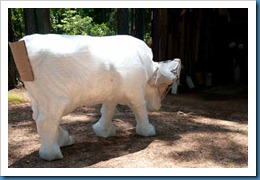
 

firstcow

Taking the bubble wrap off was awesome! She’s beautiful! The first thing we did was paint her with a coat of primer and then drew on the spots. The work was going to mess up the paint job but painting her was our first priority. We researched dairy cows to pick up on the nuances of their coats. It was a tough decision: paint her realistically or paint her as a network of shapes. Shapes seemed to be in keeping with the subject matter. Once we got her spots painted she came to life!

Painting the nose and mouth and the utter set us up for the technical design implementation. The first step in applying the design was to mark out the area for the monitors. We had monitors to use for Bessie but it became apparent that taking a monitor apart to use for our purposes wasn’t the best idea. Boxes with Plexiglas seem much more practical.


ducttape                 opening

Here’s Bessie prepped for surgery and the final moments of the removal.

488-holesYou can see the grid drawn out on Bessie’s right shoulder above. There are 4 grids which will be used for the word search puzzles. Two 10x10s and two 12x12s – that’s 488 holes! I’d never used an electric drill before; they look easy to use and since they’re electric, seemed pretty effortless… 488 hole in a fiberglass cow is work!!

It took me 3 evenings to drill all those hole. After the first day, my hands and shoulder were so sore, it was slow going. The first grid has a few out- of-sink holes, then I got the bright idea to draw the grid out. Positioning was pretty easy once they were drawn; drawing them was a challenge since Bessie is such a curvaceous bovine.


cpu

While I was drilling holes, Lee was shaping the CPU to fit Bessie’s neck. That had also seemed like a straight forward task! Lee used a Dremel tool to cut with. It took 2 1/2 packages of discs to make the first cut. CPU cases are double layers that are extremely tough! The final fitting took metal shears and some pounding and then some more Dremel-ing. The box is held into place with epoxy and is being shaped to blend into her neck with Bondo. She will forever be burdened with extra memory.

Her horns are wrapped with stereo wire. Wires are one of those unavoidable components of our technological age so they will be an integral part of her design. The wire on the horns adds color and texture; it’s hard to keep from rubbing them. We are planning to have wire as a part of the design of her tail and to also have her tangled in wire, we’ll see! If you look at her left shoulder, you can see the keyboard keys inset into all those holes I drilled!

withletters

Once again our methods were challenged. The plan was to use stamps to apply the letters to the keys for the word search puzzles. Paint and uneven surfaces don’t work well with stamps! I’d spent 2 days watching instructional videos on typography; I was primed to draw letters! Lee couldn’t work directly on the cow while I worked on the lettering, any movement and I had to wipe off and start over! She built the second monitor box and fed her children while I did the first 2 puzzles. She will finish the sanding and Bondoing while I am at work so that we can both be painting tonight.


screen-RTP-FUN

A word about the Word Search Puzzles.

Choosing a topic for the puzzles was a bit overwhelming at first. There are so many things to draw from. Technology seemed like the place to start but that turned out to be rather boring. We settled on the Triangle as our first parameter. I started looking at street names. I got maps of the Triangle from AAA and spent the better part of 2 days going through all the names and picking out names that seemed to fit into nice categories. Street names range from numbers to the generic Main or Broad St. They are named after people, trees, plants, birds, and animals. They are also named after far away lands, alcohol, and artillery. I decided to group the names into categories that had something to do with North Carolina and the Triangle and then names that were just plain out fun. We have 4 puzzles: RTP, Just for Fun, Just for Kids, and Famous People. The words will be listed on the monitor screens and the solutions will be in the Moooepedia that Bessie is reading.

You can come and see all the cows in the Cow Parade on August 18th, see the invitation: http://cowparadenc.com/wp-content/uploads/RoundUpInvite-lr.pdf

Check back for updates, it will be a busy few weeks, we have a Sock Monkey Cow to do after this one is finished!

Monday, July 2, 2012

Photography summer camp–The Elements of Design

I am very fortunate to be able to spend part of each summer sharing photography with middle school age children. The object of Level 1 is learning how to see. Maybe I should restate that, the object of camp is having fun! In the process, I am trying to teach them how to see. In return, they teach me new ways of seeing. We work on lines and grids,

 amtobaccranepullen


                                        reflections and perspective,

reflection                         duke chapel

                                                       balance and scale,

rain           symetery  

 untitled-68         size

                       color theory and repetition.

colortheory       temple

The Level 2 camp is centered around documentary photography. We travel around the Triangle, looking for similarities and differences between Raleigh, Durham, Chapel Hill and Cary NC. We went to NCSU, UNC, and Duke; the farmer’s market, a Hindu Temple, historic sites, parks, cemeteries, museums and Krispy Kreme. The favorite site turned out to be The Free Expression Tunnel on NCSU campus.

freeexp          finished product

When the temperatures reached 105, the best place was the fountain!

in fountain       eyesfountain

Summer camp is always interesting. This year the temperatures were great the first 2 weeks but it rained and got humid. The 3rd week was beautiful but recording setting hot! There’s one more week of camp in August – I wonder…..

Sunday, June 3, 2012

Starting from scratch with WordPress

During tax season this year, I treated myself to a WordPress class at the local community college . The class was supposed to use Dreamweaver as a text editor. Very exciting stuff when you want to make a few changes to your site! The class description was wrong – very frustrating… You’ve probably heard of Lynda.com; they have tutorials in every imaginable programming language and how to use tons of software. I decided to add Lynda to my Safari Books On-line educational program and start from the beginning (or almost!).

The first step in learning how to be creative with WordPress is setting up a local server on your computer. This seems pretty straight forward and I really didn’t have any trouble setting one up on my husbands laptop. The books and videos tend to either teach you the complicated method of installing Apache, MySQL and PHP individually or they tell you about MAMP, WAMP or XAMPP. In the class I took, the professor preferred XAMPP. If you want to set up your own local server, here is a link to a great step – by – step guide to installing and setting up your server.

http://sixrevisions.com/tutorials/web-development-tutorials/using-xampp-for-local-wordpress-theme-development/

As I mentioned, this worked great on my husband’s laptop but I wasn’t so fortunate with my desktop… Some pitfalls that about did me in:

  • be sure that you have no previous installations of MySQL on your computer. MySQL is a very important part of WordPress and I had taken a MySQL class in the fall to get a better understanding of the way WordPress works. I installed MySQL on my computer and my homework went smoothly. When I tried to install XAMPP, I got repeated messages about my databases (which are what MySQL is all about). I don’t remember how many times I uninstalled and re-installed XAMPP and every MySQL file I could find but I can tell you that after 2 intense days of this, my brain was pretty fried! What I learned on the 3rd day was that my computer had hidden files and that MySQL had a folder in there! Once the hidden folder was deleted, XAMPP installed beautifully but the weekend was over.
  • install WordPress directly from WordPress.org. I choose to have GoDaddy install WordPress for me as part of their hosting package which means that I didn’t have to get ‘dirty’ in the set up. It also means that my site lives totally out there in cyber space! This is a very new concept for me – I’m used to working in Dreamweaver where I know the layout of my file structure. I have yet to discover how to get my files to my desktop computer but that seems to be caused by another problem…having a purchased theme.
  • I purchased a theme. It has a lot of different template styles, some flexibility in the styling but it has a lot of those hidden files. My objective was to set up an art site quickly believing that I could take my time to learn how to tweak the code to get the font I wanted and my logo clickable, just a few small things. The CSS files were nowhere to be seen and the code that I could find was all PHP, no friendly HTML, just Get that and Echo this, it was like reading a foreign language! My suggestion is to purchase a theme only when they have exactly what you want; that you are happy with it exactly the way it is. If it’s not perfect, don’t waste the money because your ability to edit it is very limited.

What I’m doing now that I am older and wiser:

  • I am treating WordPress as a foreign language; I am starting with learning the parts of speech (PHP and MySQL).
  • I jumped into HeadFirst’s book on PHP and MySQL. Since I am not interested in writing code from scratch, I then moved into books that gave an overview of PHP like “I Hate PHP” and videos like PHP with MySQL Essential Training.
  • As my language skills have improved, I’m going back to revisit ‘Dreamweaver, The Missing Manual’ and watching the video, ‘Dreamweaver and WordPress:Core Concepts’
  • I am learning how to create child themes. This sounded much harder than tweaking my purchased theme but I think it’s overall, the best way to go. Start with a free theme from the WordPress site that has the elements that you want and then create new files to make adjustments to the theme; save the adjusted theme under a different name and viola! Of course there is a lot more depth to it than that…Some good videos on Lynda.com are ‘Start with a Theme: Photography Portfolios in WordPress’, ‘WordPress 3: Building Child Themes’ and ‘WordPress 3: Creating and Editing Custom Themes’.

I am looking forward to applying my new skills; I’m starting with a pencil and paper, laying out a visual just like I would with Dreamweaver.

Sunday, February 5, 2012

VAE Gala 2012 “For the Love of Art”


I was honored once again to be the event photographer for the 2012 Gala. It is a fun filled evening with a silent auction, dinner, and a live auction. Our group, Tipping Paint Artists, was well represented this year. N Lee Ball and Allen Clapp both had pieces in the live auction. Lori White’s piece in the silent auction, won an award. Rick Bennett and I also had pieces in the silent auction. Mine actually got bid on this year!!

live auction art      VAE Gala 2012-40

The evening started off with the silent auction. I love taking candid shots during the silent auction; people are seeing old friends as well as studying the art.

VAE Gala 2012-11        VAE Gala 2012-10       VAE Gala 2012-37

VAE Gala 2012-26       VAE Gala 2012-31     VAE Gala 2012-30

Then there is the bidding…

VAE Gala 2012-12          VAE Gala 2012-25           VAE Gala 2012-39

The silent auction is divided into 3 sections, white, yellow, and red. They close 15 minutes a part to give everyone a chance to post a last bid in each section…white at 7:45 and red at 8:15. Some years this can get pretty intense.

       untitled-125      VAE Gala 2012-42

Dan Nelson is the guest artist; he paints a piece for the live auction on site.

VAE Gala 2012-29             VAE Gala 2012-43 

 VAE Gala 2012-52


It’s hard to photograph the live auction, there’s so much activity!

VAE Gala 2012-47   VAE Gala 2012-51

Here are some of my favorite shots…

auction     over

raffle        VAE Gala 2012-34    VAE Gala 2012-55

A very successful and fun evening. Thanks to everyone that made this happen!

Tuesday, January 24, 2012

Marketing on Facebook

I picked up a copy of The Facebook Marketing Book by Dan and Alison Zarrella in hopes of demystifying Facebook. I get the sharing of photos and tidbits of life with friends but beyond that, I get lost in the quagmire. This book deals in generalities and sends you to www.facebook.com for all the details so I still have some digging to do!

Here’s what I did find useful:

  • information should be social and fun, not focused on sales. This is a social networking tool and people expect it to be used in a social manner.
  • give your content a positive spin, keep it upbeat
  • teach your reader how to do something
  • keep it simple; as the level of complexity increases the amount of sharing decreases and you want people to share your message to reach new friends
  • keep the content flowing by responding to comments on your wall and commenting on other pages
  • monitor your page; respond to questions, complaints, and compliments in a timely manner and remove inappropriate comments. It is better to address negative comments than delete them, it makes you more trust worthy
  • plan your content and create a posting schedule, this will help you stay focused
  • determine how frequently you want to post and vary the time of day that you post
  • avoid posting to frequently, you don’t want to be a pest and get blocked or unfriended
  • vary your language and how your subject matter is handled, make it interesting
  • SEO is just as important of Facebook as it is elsewhere on the web so use keywords appropriately
  • keep it under 50 words
  • avoid superlatives and flowery language
  • use good grammar and style
  • PROOFREAD!

Above all else, think before you post! This is important in all aspects of the web, once it’s in cyberspace it’s there forever! You should give just as much thought to the little comments on Facebook and Twitter as you do to longer dissertations on your web site or blog. Have fun, be careful!

Thursday, December 29, 2011

Marketing with WordPress

I am reading some great books and articles on marketing and Wordpress. I have finally begun to understand why Wordpress is so popular; it does a lot of the SEO for you! There are plugins for everything and I will be exploring many of them as I revamp our Tipping Paint Artists website.

I am going to start with the blog. I have just finished reading Internet Marketing with Wordpress by David Mercer. It’s a concise, easy to read book that covers the ways that WordPress can work for you to get your message out there. There are books on SEO that go into the behind the scenes work; with WordPress you don’t have to go behind the scenes, it takes care of that! You get to concentrate on the most important part of SEO – consistently writing high quality content that is relevant to your topic, and being persistent! I know I have room for improvement in the high quality arena but my weakest area is the persistent one which is why my New Year’s resolution is again ‘to keep up with my blog’!

I want to share with you Mr. Mercer’s list of Dos and Don’ts for blogging.

Dos

  • Choose a relevant domain name. Most people have purchased their domain name before getting to the blog stage, it’s hard to set up a blog without one. Is the domain name relevant to your business or what you are trying to promote or is it cute? A cute/fun name only helps if it is directly related to what you are doing. You want the domain name to contain words that would be used in a search if possible. My domain name, skjonesart.com, would have been better if Susan had been available but there are a lot of S Jones and Susan Jones out there on the internet!
  • Create relevant page and post titles. This seems like a no-brainer but it is awful tempting to use creative titles that are witty. Search engines don’t understand wit and need keywords to list your blog appropriately.
  • Use SEO keywords and phrases in link text. ‘Click here’ doesn’t tell Google much about the link and links are one of the best ways to get Google’s attention. So make the reference to the subject matter you are linking to the active link like I did above.
  • Create interesting content that is highly relevant to your niche. First you have to determine your niche… This is very important because it is a waste of time and energy to write good content that is geared to people that won’t appreciate what you do and will not become a customer or repeat visitor. It is also important to think about what will interest your desirable reader; keep them coming back with relevant content.
  • Use Alt and Title attributes for images. When you insert a picture into a WordPress blog, a pop-up gives you a lot of options and asks for a lot of information. I’m usually in a hurry and skip the Alt and Title attribute section but no more…Alt makes your site more user friendly, it allows the disabled to use a reading device and know what is on the page. It also shows while the image is loading so that the reader will know what’s coming. Outside of being nice to others, the alt also helps the search bots because they can’t ‘read’ a picture. The more you can include about the image and the way it relates to your purpose, the better for good SEO.
  • Use keywords naturally and where appropriate. The previous Dos tell you to use keywords in everything but you have to be careful. Remember you are talking to people and not search bots! It would be very boring to read something that was overrun with keywords and search bots might penalize you, thinking that you are spam. It’s a fine balance!
  • Encourage people to link to your site or blog. You have to tell people that you have a blog and website. The best way to do this is through social networking and becoming an active participant in other blogs and forums. You can’t be shy, you have to ask people to link to your blog and to quote your content (with attribution of course). You can interest other bloggers by commenting on their blogs and asking them to comment on yours. Set up and use a signature that contains a link back to your site or blog.
  • Proofread every blog at least once. I always find mistakes that the software doesn’t pick up on. Proofreading is also good practice for your comments on other blogs and on forums; if there are too many errors, I always discount the author and wonder if it is spam generated.

Don’ts

  • Create duplicate content. I thought I had keeping up with 3 blogs under control. I’d write one blog entry and then post it to the other 2. Not a good idea, search bots are pretty smart! The less obvious problem comes with duplicate content on the same site. The Robots Meta plugin helps WordPress keep search bots from searching legit duplicate content within your web site.
  • Copy other people’s content. Information on the web is copy righted just like printed work and those smart search bots will recognize it as duplicate content.
  • Link to too many external sites on every page.
  • Stuff your content with keywords.
  • Write content for search engines – remember to write for the people reading it.
  • Create pages with little or no content; you’ll loose your visitor.
  • Use images or other media without text or Alt information.